Instagram Carousel Templates: Creating Clarity in Your Wellness Content
Let's be honest. You didn't become a wellness coach, mindset mentor, or holistic practitioner to spend your evenings wrestling with graphic design software. You have profound knowledge to share—insights on mindfulness, nutrition, stress management, or personal growth. But the pressure to create visually appealing, consistent content for Instagram can feel like a second job. It drains your creative energy and pulls you away from the work that truly matters: coaching your clients and building your community.
This is the daily reality for countless wellness professionals. The algorithm favors carousels—those swipeable, multi-image posts that boost engagement and reach. Yet, designing a cohesive, professional-looking carousel from scratch is time-consuming. You might start with a burst of inspiration, but by the third slide, you're second-guessing color palettes, font pairings, and layout balance. The result? Inconsistent posting, frustration, and content that doesn't reflect your true expertise.
What Exactly Are These Wellness-Focused Carousel Templates?
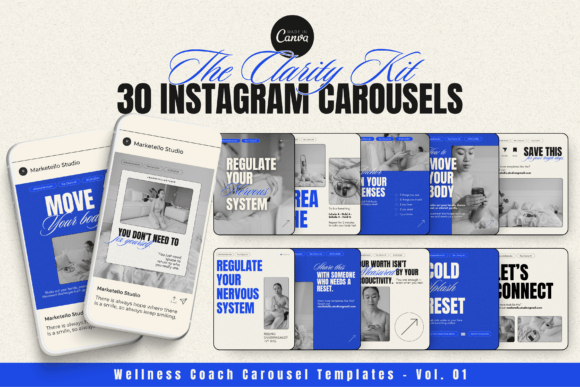
Think of the Clarity and Wellness Coach Carousel Templates – Vol. 01 not as a rigid design package, but as a flexible content framework. It's a set of 30 pre-designed, vertical templates (1080x1350 px) built specifically for Instagram's preferred carousel format. Each template is crafted with a clean, modern aesthetic using soft, calming neutral tones—colors that evoke the peace and professionalism your brand represents.
The real value lies in their structure. These aren't just pretty backgrounds. They are layouts designed for specific content types your audience craves:
- Step-by-step lesson breakdowns for teaching a new breathing technique or a journaling exercise.
- Tips and lists for sharing "5 Signs of Burnout" or "3 Grounding Practices for Anxiety."
- Educational carousels that simplify complex topics like gut health or neuroplasticity.
- Value-packed posts that establish your authority and build trust before a client ever books a call.
They are fully editable in Canva—whether you use the free or Pro version. This means you can change every element: swap colors to match your brand, edit text directly, drag and drop your own photos or icons, and use the free Google fonts included. No design degree required. The drag-and-drop structure is intentionally simple, allowing you to focus on your message, not the mechanics.
Real Scenarios: Where and When Do You Actually Use These?
The true test of any template pack is how it fits into your real, often hectic, workflow. Here’s how different professionals are using them to solve tangible problems.
For the Wellness Coach Building an Email List
You're offering a free guide on "The 7-Day Sleep Reset." Instead of a static post that gets a few likes, you create a carousel. The first slide is a compelling hook. Slides two through four share one quick tip from the guide. The final slide directs viewers to click the link in your bio to download the full PDF. The templates give you a polished, trustworthy look that encourages that click-through, turning passive scrollers into email subscribers.
For the Mindset Mentor Launching a Group Program
You need to generate excitement and explain the program's value. A multi-slide carousel is perfect. You use a template to outline the weekly themes, introduce guest experts, and share a testimonial. The consistent design across all your launch content creates a professional narrative, making your program feel substantial and well-organized. This visual consistency builds the "know, like, and trust" factor essential for high-ticket sales.
For the Holistic Practitioner with Limited Time
Maybe you're a yoga teacher or a nutritionist who also sees clients. Your "content creation" window might be 45 minutes on a Sunday. With these templates, you can batch-create a week's worth of carousels. You spend 15 minutes writing the core tips for a post on "Mindful Eating," then another 30 minutes plugging that text into three or four templates, swapping in a photo of a healthy meal. You've just planned your content for the week in under an hour, freeing up mental space for client work.
For the Spiritual Business Creator
Your brand is ethereal and personal. The soft, neutral palette of these templates serves as a perfect canvas. You can add your own bokeh light overlays, subtle texture images, or custom illustrations to make them uniquely yours. Use them to break down a complex tarot spread, explain the meaning of a crystal, or share a weekly oracle card reading. The structure helps ground your mystical content in an accessible, swipe-friendly format.
Beyond Aesthetics: The Strategic Benefits
Using a dedicated template system like this is about more than just saving time—it's a strategic business move.
- Consistency Breeds Recognition: When your audience sees a familiar color scheme and layout style, they instantly recognize your content in a crowded feed. This builds brand recall and loyalty.
- Professionalism Builds Trust: A cohesive, well-designed feed signals that you take your business seriously. It subconsciously tells potential clients that you offer a high-quality, organized service.
- Algorithm-Friendly Format: Instagram's algorithm often prioritizes carousels because they keep users on the platform longer. By using the optimized 1080x1350 format, you're working with the platform, not against it.
- Reduces Decision Fatigue: The hardest part of creating is often starting. Having a library of ready-to-go layouts eliminates the "blank canvas" paralysis. You open Canva, pick a template that fits your message, and start writing.
Is This the Right Solution for You? Key Considerations
Before you download any template pack, pause and think about your specific needs. This will help you get the most value out of your investment.
First, assess your content style. Do you primarily share quotes, personal stories, or educational breakdowns? This pack is heavily geared toward educational and value-driven content. If your feed is 90% personal photos with text overlays, you might use these less frequently, though they can still serve as a great foundation for your tips-based posts.
Second, consider your brand identity. The templates have a defined aesthetic. While everything is customizable, ask yourself if the core style—a clean, modern, and serene feel—aligns with your brand's energy. If your brand is bold, neon, and high-energy, you'll need to invest time in significantly altering the color schemes and fonts.
Third, think about your workflow. Are you already using Canva? If not, there's a small learning curve, but it's minimal. These templates are designed to be beginner-friendly. The key is to view them as a starting point. The goal isn't to use the template exactly as is, but to use it as a scaffold to build upon, ensuring your unique voice and branding shine through.
Getting Started: From Template to Published Post
Ready to put them into practice? Here's a simple, actionable workflow.
- Plan Your Content: Decide on a single, clear topic for your carousel. What is the one main takeaway you want your audience to have? Write your core points as bullet points first.
- Choose a Template Structure: Browse the 30 options. Select a layout that matches your content's flow—maybe a numbered list for tips, or a step-by-step progression for a lesson.
- Customize in Canva: Upload the template to your Canva account. Edit the text with your written content. Change the colors to your brand's hex codes. Swap placeholder images with your own photos, stock images, or simple graphics.
- Add Your Unique Touch: This is crucial. Add your logo or website URL subtly on the last slide. Include a clear call-to-action: "Save this for later," "Share with a friend who needs this," or "Click the link in bio for the full guide."
- Export and Schedule: Download the carousel as separate PNG or JPG files for each slide. Use a scheduling tool or post directly to Instagram. The vertical format will ensure it displays perfectly in the feed.
In the end, tools like the Clarity and Wellness Coach Carousel Templates are about reclaiming your time and creative focus. They handle the design heavy lifting so you can concentrate on what you do best: guiding others toward greater well-being, clarity, and growth. By systematizing the visual part of your content, you create more mental and temporal space to deepen your practice and serve your audience more effectively. That’s the real clarity these templates can help you achieve.