Master Your Instagram Strategy with Editable Story Templates
In the rapidly evolving landscape of social media, static images on a grid are no longer the only measure of success. Today, the ephemeral, vertical format of Instagram Stories has taken center stage, often proving more critical for engagement than a curated main feed. For creators, photographers, and freelancers, the challenge is not just posting, but maintaining a professional and consistent visual identity amidst the daily content grind. This is where high-quality Story Templates for Canva and Photoshop become an indispensable tool in your creative arsenal.
The Strategic Shift to Vertical Content
There is a distinct shift in how audiences consume content. While a polished feed establishes your brand's aesthetic, Stories provide the raw, immediate connection that builds trust. However, designing unique graphics from scratch every single day is unsustainable for busy entrepreneurs and small business owners. You need a workflow that balances creativity with efficiency.
Editable story templates bridge this gap perfectly. They offer a pre-designed, professional structure that you can reuse indefinitely. Instead of staring at a blank canvas, you start with a solid foundation. This approach is particularly valuable for visual professionals like photographers who need to showcase sample images without spending hours in post-production software. By utilizing a consistent set of templates, you create a recognizable brand voice that followers will learn to associate with quality.
Practical Uses for Every Niche
The versatility of these templates allows them to fit seamlessly into various professional and personal contexts. Whether you are a freelancer looking to land new clients or a blogger sharing your latest adventure, the application is broad and effective.
Consider the following scenarios where these templates shine:
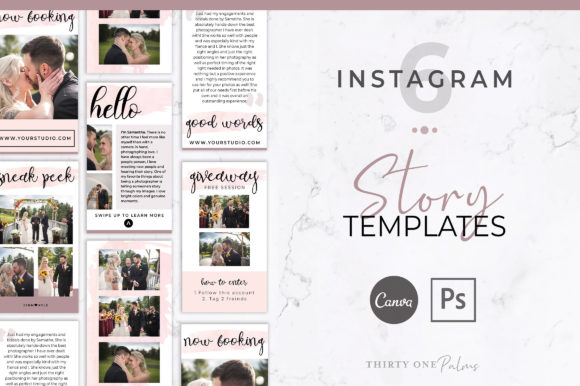
- Promoting Services: Use bold typography and clean layouts to announce openings for new clients or highlight specific packages you offer.
- Hosting Giveaways: Create excitement with dynamic layouts that clearly outline entry rules and prize details, driving higher participation.
- Sneak Peeks: Photographers and artists can tease upcoming projects or gallery releases, building anticipation among their audience.
- Sharing Sample Images: Display your portfolio in a structured way that respects the composition of your photos while adding context through text overlays.
These templates are not just for commercial use; educators and hobbyists can use them to share tips, tutorials, and personal milestones with a polished look that elevates their message above the noise.
What You Receive: A Dual-Platform Solution
Understanding the technical deliverables is key to appreciating the value of this resource. When you acquire a professional pack, you are essentially getting a dual-platform solution tailored to modern workflows. A standard high-quality offering typically includes:
- 6 Editable Story Templates for Canva: Optimized at 1080 x 1920 pixels, these are accessible via a direct link. Canva is ideal for quick edits on the go, whether you are on your computer or using the mobile app on your phone.
- 6 Editable Story Templates for Photoshop: Also sized at 1080 x 1920 pixels, these are designed for desktop use. They utilize Smart Objects, a feature that allows you to insert your own photos with a single click, automatically adapting them to the frame without manual resizing.
- Step-by-Step Help: To ensure you aren't left guessing, instructions are included to guide you through the editing process, making it accessible even for those with only basic software knowledge.
How It Works: Simplicity Meets Flexibility
The workflow for using these assets is designed to be frictionless. Upon purchase, you receive immediate access to your files. For Canva users, this means receiving a link that opens the template directly in your browser. The interface is intuitive; you simply click on the text to change the headlines, swap out the font styles to match your brand, and upload your own images to the designated placeholders.
For those who prefer the control of Adobe Photoshop, the process is equally streamlined but offers deeper customization. You will need a desktop computer to run Photoshop effectively. The inclusion of Smart Objects means you don't need to be an expert editor. You double-click the layer, paste your image, save, and the template updates automatically. This feature is particularly helpful for photographers who want to ensure their images are displayed at the highest possible quality without compression artifacts often found in browser-based editors.
Customization and Brand Identity
One of the greatest strengths of using a template pack is the ability to maintain brand consistency while varying your content. You are not locked into a single color scheme. You have the freedom to change colors, fonts, and imagery to match seasonal campaigns or specific client projects. This adaptability means you can reuse the same six templates for months without your content feeling repetitive. It is about working smarter, not harder, to maintain a professional presence.
Who Benefits Most?
While these tools are accessible to anyone, certain groups will find them particularly transformative.
- Freelancers: Save billable hours on design work and focus on client delivery.
- Small Business Owners: Maintain a consistent marketing schedule without hiring a dedicated social media manager.
- Content Creators: Keep your aesthetic fresh and engaging to retain audience interest.
It is important to note that while the Canva version offers convenience, the Photoshop version provides the precision often required by design professionals. Regardless of your skill level, having access to both formats ensures you are equipped for any situation.
Final Thoughts on Implementation
Adopting a template-based approach to your Instagram Stories is a strategic move that pays dividends in time saved and professionalism gained. It removes the guesswork from daily posting and ensures that every time you appear on a follower's screen, you are putting your best foot forward. By integrating these editable assets into your workflow, you empower yourself to communicate your message effectively, whether you are announcing a new service or simply sharing a beautiful moment from your day.