Streamline Your Self-Publishing with KDP Book Formatting Templates
The journey from a finished manuscript to a published book on Amazon Kindle Direct Publishing (KDP) is filled with excitement, but it can also be riddled with technical roadblocks. One of the most common and frustrating hurdles is book formatting. Ensuring your interior layout, margins, and trim size meet Amazon's strict guidelines can feel like a puzzle, especially for first-time authors. This is where professional book formatting templates for Amazon KDP become an indispensable tool, transforming a complex process into a straightforward, manageable task.
What Exactly Are These KDP Formatting Templates?
At its core, this collection is a comprehensive toolkit designed to remove the guesswork from preparing your book for publication. It provides you with pre-structured files that are already configured to meet Amazon's technical specifications. Think of it as a blueprint for your book's interior. Instead of starting from a blank page in Word or InDesign, you begin with a document that has the correct page size, margins, gutter, and baseline grid already established.
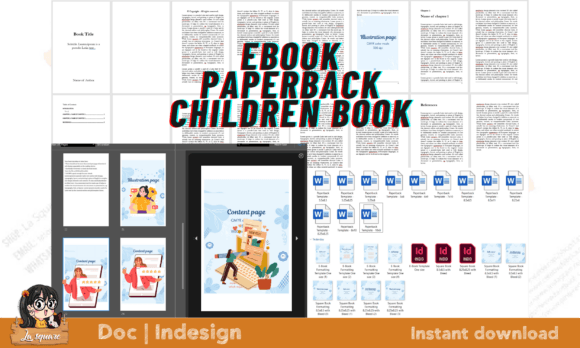
This particular listing is especially robust, offering a multi-format solution for various publishing goals. It includes:
- 12 Ready-to-Use Word Templates: These cover the most popular paperback trim sizes, from the standard 5.5x8.5 to the larger 8.5x11. This variety ensures your book looks professional, whether it's a novel, a workbook, or a textbook. The templates are fully editable, allowing you to adjust the size to your precise preference if needed.
- 03 InDesign Files for E-Book Creation: For those aiming to create a flowable EPUB, these files provide a professional starting point. They are ideal for authors who want more control over their e-book's design and functionality.
- Square Book Templates with Bleed: Specifically designed for visual-heavy projects like children's books or cookbooks, these templates in 8.5x8.5 and 8.25x8.25 sizes include bleed. This is crucial for designs where images extend to the edge of the page. You can export them to PDF for a paperback or use them with Kindle Kids Book Creator for an EPUB.
Creative Possibilities and Practical Applications
The true value of these templates lies in how they unlock creative potential by handling the technical foundation. Here’s how different creators can leverage them:
For the Novelist and Fiction Writer
You can focus entirely on your storytelling. Choose a classic trim size like 5.25x8.25 or 6x9, import your manuscript, and use the built-in styles for chapter headings and body text. The templates ensure consistent font sizing, line spacing, and paragraph indentation, giving your book a polished, bookstore-quality feel without manual tweaking of every page.
For the Children's Book Author or Illustrator
Visual storytelling demands precise formatting. The square templates with bleed are perfect for full-spread illustrations. You can design your pages in Canva or another program, ensuring critical elements are within the safe zone, and then place them into the template. This guarantees that your vibrant colors and characters will print exactly as intended, with no awkward white borders.
For the Cookbook Creator or Educator
Cookbooks, workbooks, and educational guides often mix text with images, charts, and sidebars. Using a larger trim size like 8.5x8.5 or 8x10 provides the real estate needed for this complex layout. The templates help maintain a clean, organized grid, ensuring recipes and instructional content are easy to follow and visually appealing.
For the Indie Author on a Budget
Hiring a professional formatter can be a significant expense. These templates offer a budget-friendly, yet professional, alternative. They are particularly useful for authors who have designed their book cover or interior graphics in Canva. If you've struggled with Amazon rejecting your file because it's an image-only PDF, these Word and InDesign templates provide the correct, text-based framework you need for acceptance.
How to Use the Templates Effectively
Getting started is designed to be intuitive, even for beginners. The process generally follows these steps:
- Select Your Template: Choose the Word or InDesign file that matches your desired book size and format (paperback or e-book).
- Import Your Content: Copy and paste your text from your manuscript into the template. Use the pre-defined styles (Heading 1, Heading 2, Body Text) to format your chapters and sections consistently.
- Customize the Design: While the structure is set, you have full control over fonts, colors, and decorative elements. Ensure your design choices align with your book's genre and target audience.
- Insert Images (If Applicable): For cookbooks or children's books, place your images into the designated placeholders, making sure they extend to the bleed lines where necessary.
- Export and Upload: Save your final file as a PDF for paperback or use the InDesign files to generate an EPUB. Then, upload it directly to your KDP dashboard.
Keeping Your Results Professional and Audience-Friendly
While the templates handle the heavy lifting, a few best practices will ensure your final product is exceptional:
- Consistency is Key: Use the same font for all body text and a complementary font for headings throughout the book. The templates make this easy to enforce.
- Proofread in Layout: Always review your formatted book. Check for awkward page breaks (like a chapter starting at the very bottom of a page), widows and orphans (single lines stranded at the top or bottom of a page), and image placement.
- Know Your Audience: A business book might benefit from a clean, sans-serif font and ample white space, while a fantasy novel might use a serif font with more decorative chapter titles. Let your book's content guide your stylistic choices within the template's framework.
Don't let formatting become the barrier between your finished manuscript and your published book. By using these structured Amazon KDP book formatting templates, you can bypass the most common technical frustrations. You save time, reduce stress, and ensure your book meets professional standards, allowing you to share your story or knowledge with the world confidently. It’s about working smarter, not harder, on your self-publishing journey.