Streamlining Your Día de los Muertos Designs: A Practical Guide to Using Watercolor Templates
Creating high-quality, culturally respectful, and visually stunning designs for Día de los Muertos can be a complex process. Whether you are a freelancer working on a client brief, a small business owner preparing promotional materials, or a hobbyist crafting personal decorations, the balance between artistic quality and deadline efficiency is crucial. This is where a structured approach to design assets—specifically, high-quality Día De Muertos Watercolor Templates—transforms a chaotic creative session into a streamlined workflow.
Understanding the Asset: More Than Just Images
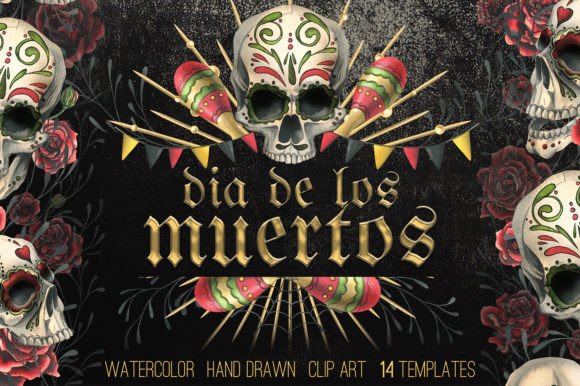
Before integrating these assets into your project, it is essential to understand exactly what you are working with. A professional collection of Día De Muertos Watercolor Templates is not merely a folder of pictures; it is a comprehensive design system. The collection described here focuses on the "calavera" (skull) aesthetic, featuring human skulls adorned with ornaments, sombrero hats, and maracas, complemented by red roses, candles, and cobwebs.
These elements are hand-drawn using traditional watercolor techniques and subsequently digitized at a high resolution (300 DPI). This digitization process is the bridge between traditional art and modern utility. For the end-user, this means you get the organic, textured feel of hand-painted art without the time-consuming cleanup usually associated with scanning physical paintings. The set includes 14 templates, frames in JPG and PNG formats, and, crucially, isolated elements on transparent backgrounds. This specific composition allows for modular usage—you are not locked into a single static image but can deconstruct and reconstruct the art to fit specific dimensions and layouts.
Mapping the Workflow: Where Templates Fit In
In a professional design workflow, efficiency is often determined by how quickly you can move from the "concept" phase to the "execution" phase. For a project involving Día de los Muertos themes, the typical workflow involves concepting, sourcing assets, layout design, and final output. The watercolor templates fit primarily into the "sourcing" and "layout" stages, effectively compressing the timeline.
Phase 1: Project Scoping and Selection
The implementation begins before you even open your design software. During the planning phase, you must define the medium. Are you designing for digital consumption (social media banners, website headers) or physical products (textiles, wrapping paper, flyers)? Because the templates include seamless borders and patterns, they are versatile. For a textile design, you might prioritize the seamless patterns. For a flyer, the pre-made compositions and frames are more relevant. By auditing the deliverables against the asset list early on, you save significant time later.
Phase 2: Integration with Design Software
Once the project scope is defined, the technical integration begins. The assets are provided as PNG files with transparent backgrounds. This is a critical feature for workflow efficiency. It eliminates the need for manual masking or background removal, a task that can take hours when dealing with complex watercolor edges.
In software environments like Adobe Photoshop, Illustrator, or Affinity Designer, these PNG files can be dragged and dropped directly onto the canvas. Because they are high-resolution (300 DPI), they are print-ready immediately. This removes the common bottleneck of resolution upscaling, which often degrades quality. You can layer these watercolor elements over textured backgrounds or solid colors without worrying about pixelation or jagged edges.
Practical Application: From Digital to Physical
The versatility of these templates allows them to serve multiple functions within a single campaign or season. Understanding how to manipulate the assets ensures you get the maximum return on your design investment.
Creating Cohesive Marketing Collateral
For businesses or marketers, visual consistency is key. If you are promoting a Día de los Muertos event or product line, you need a unified look across flyers, social media ads, and email headers. The pre-made compositions in the template set serve as anchor points. You can use the full frame compositions for the main poster or flyer to establish the visual theme. Then, you can break down those compositions by using the isolated elements—the skull, the roses, the maracas—to create smaller graphics for social media posts or stickers. This ensures that while the assets vary in size, the artistic style remains perfectly consistent.
Textile and Product Design
When moving into physical goods, such as clothing or accessories, the "seamless patterns" included in the set become the primary focus. These patterns are designed to tile without visible breaks, allowing you to create all-over prints for fabric. The watercolor aesthetic gives the fabric a high-end, artisanal feel that flat vector graphics often lack. For wrapping paper, the seamless borders provide a quick solution that requires minimal adjustment, allowing you to focus on the print production specifications rather than the design creation itself.
Customization and Adaptability
While the templates provide a complete look, the inclusion of isolated elements allows for customization. If a specific composition features a skull with a sombrero, but your design requires just the skull with roses, you can easily separate them. This modularity is vital for fitting the art into awkward spaces, such as the sidebar of a website or the back of a business card. The transparent backgrounds ensure that these elements can overlap other design components—like text or other illustrations—without leaving white boxes or artifacts.
Workflow Efficiency and Quality Control
Using pre-designed templates does not mean sacrificing originality; it means prioritizing execution. By starting with a high-quality watercolor base, you bypass the "blank canvas" paralysis. However, quality control is still necessary.
When implementing these designs, pay attention to color management. Watercolors have specific tonal ranges; ensure that your monitor is calibrated so the reds of the roses and the deep blacks of the cobwebs print true to the digital file. Furthermore, since the set includes JPG frames (which have a background) and PNG elements (which do not), be mindful of which file type you are using for which layer. Using a JPG isolated element on a colored background will result in a visible white box, breaking the immersion of the design.
Long-Term Utility and Asset Management
A robust design workflow includes asset management. Since these templates are delivered in a Zip archive, organization is the first step upon download. It is advisable to create a specific directory structure for these assets, separating the "Templates/Frames" from the "Isolated Elements" and "Patterns." This allows for rapid retrieval in future projects. Even if a project does not require a full Día de los Muertos theme, the individual elements—like red roses or cobwebs—can be repurposed for Halloween designs or general floral projects. Proper organization ensures these assets remain useful long after the holiday season has passed.
Ultimately, the goal of using Día De Muertos Watercolor Templates